
How to Fill Out IRS Form W-4, Step by Step
In this article
Filling out a Form W-4 can seem like a daunting task, especially if it's your first time. However, understanding how to complete this form accurately is crucial for managing your tax withholdings and ensuring you don't end up owing the IRS at the end of the year.
In this Form W-4 tutorial, we'll break down the process step by step to make it as simple as possible.
Introduction to Form W-4
Form W-4, also known as the Employee's Withholding Certificate, is a document that every new employee must fill out in the United States. This form allows your employer to determine how much federal income tax to withhold from your paycheck. The information you provide on your Form W-4 directly impacts whether you'll receive a tax refund or owe money at tax time.
Step-by-step Guide on Filling Out Form W-4
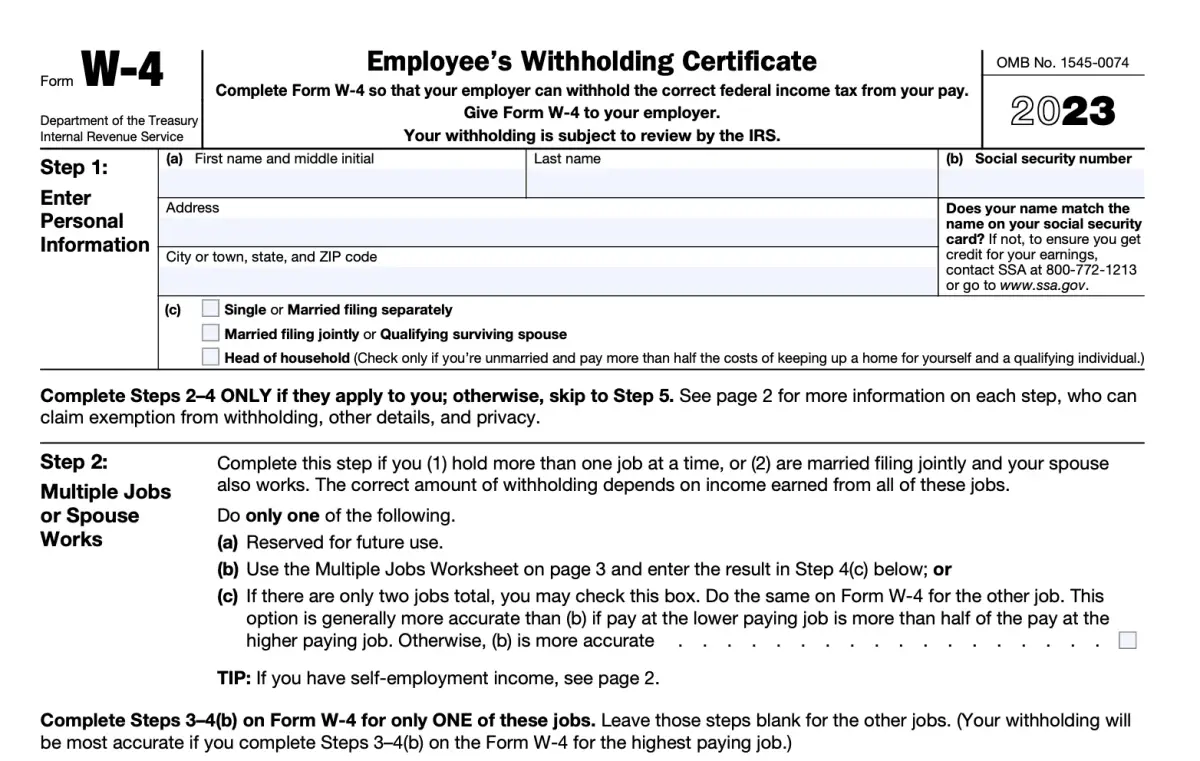
Step 1: Personal Information
The first section of the form requires basic personal information. You'll need to provide your full name, social security number, and address. You will also need to select your filing status (single, married filing jointly, married filing separately, head of household).
Step 2: Multiple Jobs or Spouse Works
In this section, you have three options:
- Use the IRS’s online Tax Withholding Estimator for most accurate withholding.
- Use the Multiple Jobs Worksheet on page 3 and enter the result in Step 4(c).
- If there are only two jobs total in your household, you can check box C.
Remember that each job needs its own Form W-4.
Step 3: Claim Dependents
If you have dependents, this section is where you can claim them. The IRS provides specific dollar amounts that reduce your taxable income based on whether they qualify for child tax credit or credit for other dependents.
Step 4: Other Adjustments (Optional)
This section is optional and includes:
a) Other income (not from jobs), if you want tax withheld for other income you expect this year that won’t have withholding, enter the amount of other income here. This may include interest, dividends, and retirement income.
b) Deductions. If you expect to claim deductions other than the standard deduction and want to reduce your withholding, use the Deductions Worksheet on page 3 and enter the result here.
c) Extra withholding. Enter any additional tax you want withheld each pay period.
Step 5: Sign and Date
The last step is to sign and date the form. By doing so, you're verifying that all the information provided is correct to your knowledge.
Tips for Filling Out Form W-4
1) Review Your W-4 Annually: It's a good idea to review your W-4 annually or whenever there are significant changes in your life such as marriage, divorce, birth of a child or buying a home. These events can affect your tax situation.
2) Seek Professional Advice: If you're unsure about how to fill out your W-4 or have complicated financial circumstances, it may be beneficial to seek advice from a tax professional. Portside can help!
3) Use IRS Resources: The IRS provides several resources including an online Tax Withholding Estimator which can help determine how much tax should be withheld from your paycheck.
Filling out Form W-4 doesn't have to be intimidating. By understanding each step of the process and using available resources like this Form W-4 tutorial, you can accurately complete this form with confidence. Remember that it's important to review your W-4 annually or whenever there are significant changes in your life to ensure accurate withholding and avoid any surprises at tax time.
About the Author

Dane Janas, EA
Dane Janas is an IRS-licensed Enrolled Agent and Quickbooks ProAdvisor. He is a tax and accounting professional serving individuals, service-based businesses, and nonprofits nationwide.
Additional Resources
For the most current tax information and regulations, visit the official IRS website or consult with a qualified tax professional.
Related Articles

1099 Contractor vs. Employee: Key Differences
Choosing between 1099 and employee status affects taxes, benefits, and legal risk. Here's how the two arrangements actually compare.
July 17, 2026

Salary vs. Owner Distributions: What's the Difference?
Salary and owner distributions are taxed differently and carry different compliance risks. Here's how S-Corp owners should think about each.
July 17, 2026

IRS Form 940 vs. 941: What's the Difference?
Form 940 covers federal unemployment tax; Form 941 covers quarterly payroll tax. Here's what each one reports and when it's due.
July 17, 2026
Ready to Get Started?
Let us help you navigate your financial challenges with personalized solutions tailored to your needs.
Start Your Assessment