
IRS W-4 Multiple Jobs Worksheet, Explained

In this article
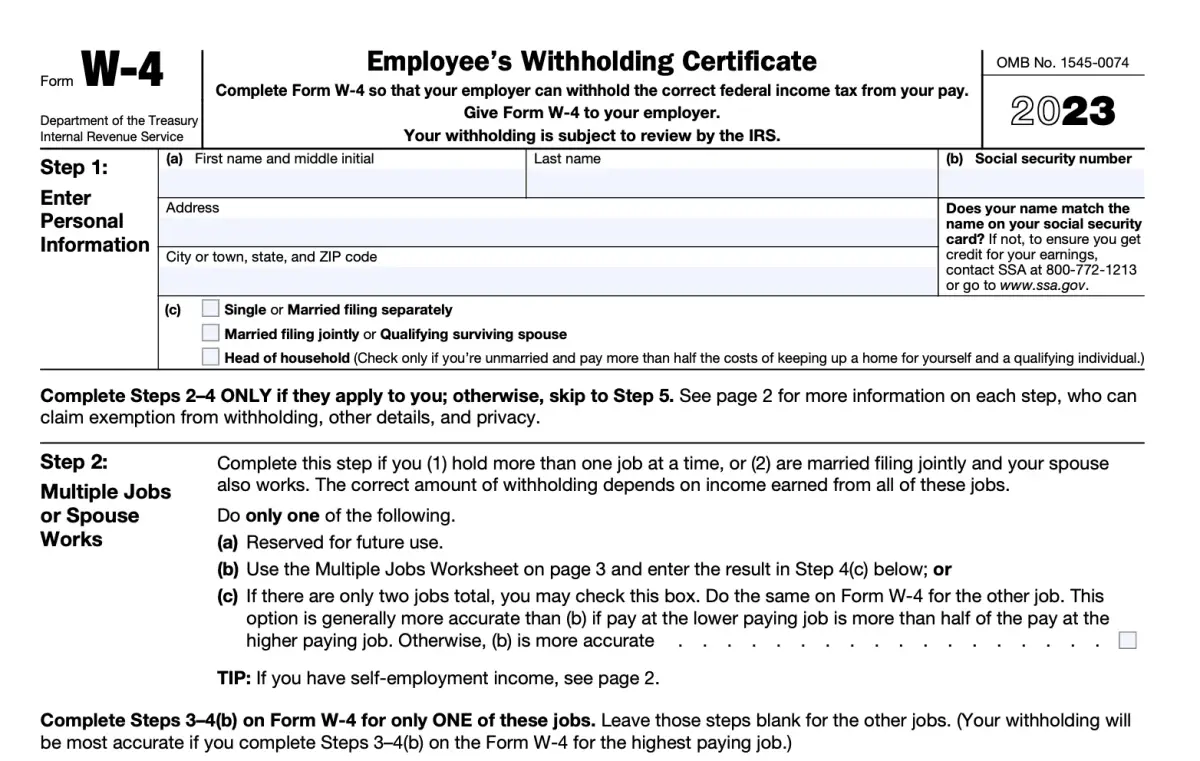
When you start a new job, one of the first forms you’ll complete is IRS Form W-4, which tells your employer how much federal income tax to withhold from your paycheck. If you have more than one job — or if you’re married and your spouse also works — you’ll notice the form includes a special section: the Multiple Jobs Worksheet. This worksheet helps you adjust your withholding so you don’t end up underpaying taxes and facing a surprise bill at tax time.
If you’re not familiar with the W-4 in general, check out our guide to completing Form W-4 first, then come back here to dive deeper into the multiple jobs section.
Why the Multiple Jobs Worksheet Exists
Federal tax withholding is based on the assumption that each job is your only job. But if you work two jobs, or you and your spouse both work, your household income is higher than each employer realizes. Without an adjustment, each employer may withhold too little, and you’ll owe tax when you file your return.
The worksheet (or the IRS Tax Withholding Estimator online) helps you calculate a more accurate withholding amount by accounting for your combined income across jobs.
How the Multiple Jobs Worksheet Works
The worksheet is on page 3 of Form W-4 and has three simple steps. Here’s how to use it:
Step 1: Find your situation
You’ll use the IRS tax tables included in the instructions. If you and your spouse each have one job, or you have two jobs total, you’ll simply look up your combined wages and find the adjustment amount in the tables.
Step 2: Enter the additional amount
Once you find the adjustment, you’ll write that number on line 4(c) of your W-4 as “extra withholding.” This tells your employer to withhold more from each paycheck.
Step 3: Repeat if necessary
If you and your spouse both work, you’ll generally only complete the worksheet for the higher-paying job and use that W-4 to make the adjustment.
Common Scenarios Explained
Two Jobs (You Only)
If you have two jobs, you’ll enter the adjustment on the W-4 for the higher-paying job. This ensures enough tax is withheld to cover both.
Married Filing Jointly (Both Spouses Work)
If both spouses work one job each, the worksheet will show you how much extra to add. Again, you typically adjust the higher-paying job’s W-4 only.
More Than Two Jobs
If you or your spouse have more than two jobs combined, the IRS strongly recommends using the online Tax Withholding Estimator. It can handle multiple income sources more precisely than the paper worksheet.
Tips for Getting It Right
- Use the IRS online estimator if your income changes during the year (new job, raise, etc.).
- Double-check your paystub a month or two after submitting your W-4 to ensure withholding looks correct.
- Update your W-4 anytime your household income changes significantly.
Final Thoughts
The W-4 multiple jobs worksheet can feel intimidating, but it’s really just a tool to help prevent under-withholding. Whether you’re juggling multiple jobs yourself or filing jointly with a working spouse, taking a few minutes to fill it out correctly can save you from a tax surprise later.
If you want peace of mind, our team at Portside can walk you through the worksheet, run the numbers, and help you make sure your withholding matches your real tax situation. That way, you can focus on your paycheck — not on worrying about an unexpected bill at tax time.
Disclaimer: This post is for informational purposes only and should not be considered tax or legal advice. Each situation is unique, and you should consult with a tax professional before making decisions about your tax withholding.
About the Author

Dane Janas, EA
Dane Janas is an IRS-licensed Enrolled Agent and Quickbooks ProAdvisor. He is a tax and accounting professional serving individuals, service-based businesses, and nonprofits nationwide.
Additional Resources
For the most current tax information and regulations, visit the official IRS website or consult with a qualified tax professional.
Related Articles

1099 Contractor vs. Employee: Key Differences
Choosing between 1099 and employee status affects taxes, benefits, and legal risk. Here's how the two arrangements actually compare.
July 17, 2026

Salary vs. Owner Distributions: What's the Difference?
Salary and owner distributions are taxed differently and carry different compliance risks. Here's how S-Corp owners should think about each.
July 17, 2026
How to Fill Out IRS Form W-4, Step by Step
Getting your W-4 right prevents surprise tax bills or oversized refunds. Here's a step-by-step walkthrough of the form.
July 17, 2026
Ready to Get Started?
Let us help you navigate your financial challenges with personalized solutions tailored to your needs.
Start Your Assessment